
PinnedWell is reader-supported. When you buy through links on our site, we may earn an affiliate commission at no extra cost to you. This helps us keep creating honest, research-backed content.
I'm lazy. I know that sounds like a weird opening for a wellness blog, but it's the honest truth behind my best sleep setup. I figured out that the reason my wind-down routine kept failing wasn't that I didn't know what to do — it was that doing it required effort at the exact moment of the day when I had the least willpower.
Dim the lights? That means getting up and walking to the switch. Lower the thermostat? I'd have to find my phone and open the app. Turn on the white noise machine? It's across the room. Each individual action takes 10 seconds, but at 9:30 PM when I'm already on the couch, even 10 seconds of effort per task feels like climbing Everest.
So I automated all of it. Now, at 9 PM, my house starts putting itself to bed. Lights shift warm and dim. The thermostat drops. The bedroom diffuser kicks on. The white noise starts. The only thing I have to do is show up in the bedroom, and everything is already set for optimal sleep.
Here's the exact setup, what it costs, and how to build it yourself even if you've never set up a smart device before.
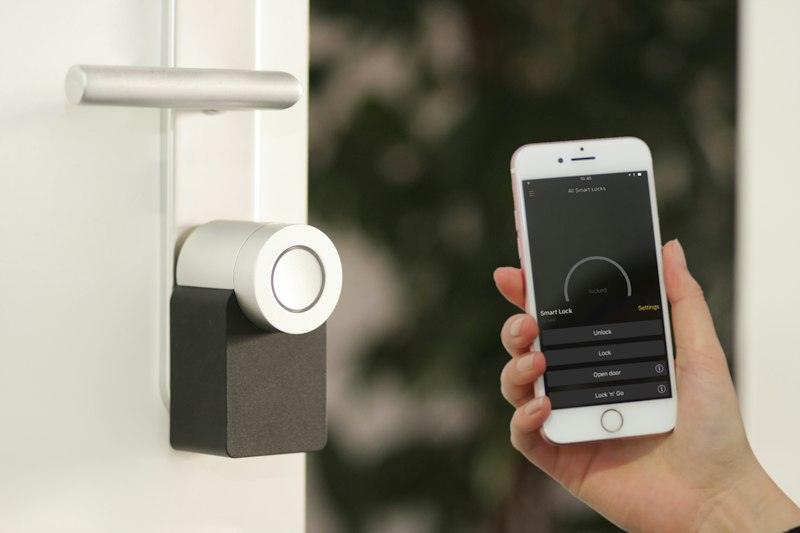
The Foundation: A Smart Home Hub
You can run smart devices without a hub using individual apps, but it's a mess. Different apps for different brands, nothing talks to each other, and you end up with 6 apps open to run your bedtime routine. A hub centralizes everything.
I use Apple HomeKit because we're an iPhone household, but Amazon Alexa and Google Home both work equally well. The key is picking one ecosystem and sticking with it.
If you're starting from scratch, the Amazon Echo Dot is the cheapest entry point at $50. "Alexa, good night" can trigger your entire routine with a single voice command.
The Lighting: Warm, Dim, Automatic
This is the highest-impact piece of the setup. Light is the most powerful signal your body uses to regulate its sleep-wake cycle.
Philips Hue White Ambiance bulbs in every bedroom lamp and the hallway. These shift from energizing cool white (5000K) during the day to warm amber (2200K) in the evening. I have them on an automated schedule:
- 7 AM: Gradually brighten to 4000K (simulated sunrise on cloudy mornings)
- 7 PM: Shift to 3000K, 80% brightness
- 9 PM: Shift to 2200K, 30% brightness
- 10 PM: Off
The 9 PM transition is the one that matters most. When those lights shift to deep amber, my brain gets the "start winding down" signal automatically. I don't have to remember to dim anything or switch modes. It just happens.
Pro tip: If Philips Hue is too expensive, Wyze Bulb Color does the same temperature shifting for about $8/bulb. They work with Alexa and Google Home. The app isn't as polished, but the functionality is 90% there.
The Temperature: Cool Before You Arrive
Sleep research consistently shows that the optimal bedroom temperature for sleep is 65-68 degrees Fahrenheit. Most people keep their houses at 72 during the day, which means the bedroom is too warm when they get in bed.
I have a smart thermostat (we use the Ecobee Premium) programmed to drop to 67 at 9 PM. By the time I get into bed around 10, the room is cool and ready. It climbs back to 70 at 6 AM so we're not freezing when the alarm goes off.
What We Like
Room to Improve
If a smart thermostat is out of budget, a simple smart plug with a fan is a cheaper way to automate cooling. Plug your bedroom fan into a smart plug, schedule it to turn on at 9 PM, and you get the cooling effect without replacing your thermostat.
The Sound: White Noise on Autopilot
I've tried sleep playlists, rain sounds on my phone, and meditation apps. The problem with all of them is that they require my phone in the bedroom, which defeats the purpose of keeping screens out.
A dedicated Hatch Restore handles this beautifully — you can program it to start playing brown noise or rain sounds at a specific time as part of your routine. But if you already have a smart speaker in the bedroom, you can just automate it: "Alexa, at 9:30 PM, play brown noise for 8 hours at volume 3."
The brown noise specifically is key. It's deeper than white noise and masks a wider range of frequencies — street noise, HVAC clicks, the dog adjusting on her bed. I sleep through things now that used to wake me up.

The Complete Automation Schedule
Here's my actual schedule, running through Apple HomeKit:
| Time | Action | Device |
|---|---|---|
| 7:00 AM | Lights brighten gradually to 4000K | Hue bulbs |
| 7:00 AM | Thermostat → 70°F | Ecobee |
| 7:00 PM | Lights shift to 3000K, 80% | Hue bulbs |
| 9:00 PM | Lights shift to 2200K, 30% | Hue bulbs |
| 9:00 PM | Thermostat → 67°F | Ecobee |
| 9:00 PM | Diffuser on (via smart plug) | Smart plug |
| 9:30 PM | Brown noise starts | Hatch Restore |
| 10:00 PM | All lights off | Hue bulbs |
| 6:00 AM | Thermostat → 70°F | Ecobee |
| 6:30 AM | Sunrise simulation begins | Hatch Restore |
The entire thing runs without any input from me. I set it up once and haven't touched it in months.
Total Cost Breakdown
| Component | Product | Cost |
|---|---|---|
| Smart hub | Echo Dot | $50 |
| Smart bulbs (4) | Hue White Ambiance | $100 |
| Smart thermostat | Ecobee Premium | $250 |
| Smart plug (diffuser) | Amazon Smart Plug | $25 |
| Sleep sound + sunrise | Hatch Restore 2 | $200 |
| Total | $625 |
That's not cheap. But I'll frame it differently: I spent $625 once and my sleep has been measurably better every night for the past eight months. That's about $2.60/night for better rest. I spend more than that on bad coffee.
Budget version: Skip the Ecobee ($250) and Hatch ($200), use Wyze bulbs ($32 for 4), an Echo Dot ($50), a smart plug with a fan ($25), and the Alexa brown noise for free. Total: about $107.
Frequently Asked Questions
Does all this tech in the bedroom disrupt sleep? The key is that these devices are ambient, not interactive. Smart bulbs don't have screens. The thermostat is in the hallway. The only bedroom devices are the Hatch (no blue light, just warm amber) and a speaker that plays sound. There's nothing to look at, tap, or scroll.
What if my partner has a different schedule? Smart bulbs can be assigned to different rooms. I automate the shared bedroom and hallway on our earlier schedule. My husband's office lamp stays bright until he's done working. The Hatch has dual alarms for different wake times.
What happens during a power outage? Everything resets to defaults when power returns. Smart bulbs come on at 100%, the thermostat goes back to its hold temperature. It's mildly annoying but rare. The schedule re-syncs automatically once Wi-Fi reconnects.
Can I do this in a rental? Yes. Smart bulbs screw into existing fixtures — no wiring needed. Smart plugs plug into standard outlets. The only potential issue is the thermostat, which requires installation. Skip it in a rental and use a fan + smart plug instead.
The best sleep routine is the one you don't have to think about. Willpower is finite, and by 9 PM, most of us are running on fumes. Automating the boring mechanics of sleep hygiene — temperature, light, sound — means your environment prepares itself for rest whether you're feeling disciplined or not. Set it up once, sleep better every night.
Related Articles

The Best Baby Monitors in 2026 (A Sleep-Deprived Mom's Definitive Ranking)
After testing five popular baby monitors over three years and two kids, here is my honest ranking based on picture quality, reliability, and whether they actually let you sleep. No sponsorships, just opinions from the trenches.

The 2026 Baby Registry Must-Haves That Actually Get Used (From a Second-Time Mom)
Skip the cute-but-useless stuff and register for the baby products that will actually save your sanity. A second-time mom breaks down the registry items she used daily versus the ones that collected dust.